前面两篇分别介绍了目前流行的模板引擎Freemaker和Thymeleaf构建web应用的方式,接下来我们看一下号称性能最好的国产模板引擎Beetl,如何搭建web环境
本文主要来自官方文档,如有疑问,推荐查看: http://ibeetl.com/guide/#beetl
I. 准备
1. 依赖
首先我们是需要一个springboot项目,基本的pom结构大都相似
1
2
3
4
5
6
7
8
9
10
11
12
13
14
15
16
17
18
19
20
21
22
23
24
25
26
27
28
29
30
31
32
33
34
| <parent>
<groupId>org.springframework.boot</groupId>
<artifactId>spring-boot-starter-parent</artifactId>
<version>2.0.4.RELEASE</version>
<relativePath/>
</parent>
<properties>
<project.build.sourceEncoding>UTF-8</project.build.sourceEncoding>
<project.reporting.outputEncoding>UTF-8</project.reporting.outputEncoding>
<spring-cloud.version>Finchley.RELEASE</spring-cloud.version>
<java.version>1.8</java.version>
</properties>
<build>
<pluginManagement>
<plugins>
<plugin>
<groupId>org.springframework.boot</groupId>
<artifactId>spring-boot-maven-plugin</artifactId>
</plugin>
</plugins>
</pluginManagement>
</build>
<repositories>
<repository>
<id>spring-milestones</id>
<name>Spring Milestones</name>
<url>https://repo.spring.io/milestone</url>
<snapshots>
<enabled>false</enabled>
</snapshots>
</repository>
</repositories>
|
在这个项目中,我们主要需要引入两个依赖包,一个web,一个官方提供的beetl-framework-starter,当前最新的版本为 1.2.12.RELEASE
1
2
3
4
5
6
7
8
9
10
11
| <dependencies>
<dependency>
<groupId>org.springframework.boot</groupId>
<artifactId>spring-boot-starter-web</artifactId>
</dependency>
<dependency>
<groupId>com.ibeetl</groupId>
<artifactId>beetl-framework-starter</artifactId>
<version>1.2.12.RELEASE</version>
</dependency>
</dependencies>
|
2. 配置参数
通常我们直接使用默认的thymeleaf参数配置即可,下面给出几个常用的配置
1
2
3
4
5
| beetl:
enabled: true
suffix: btl
beetl-beetlsql:
dev: true
|
II. 项目搭建演示
1. 项目结构
搭建一个web项目和我们之前的纯后端项目有点不一样,前端资源放在什么地方,依赖文件怎么处理都是有讲究的,下面是一个常规的项目结构
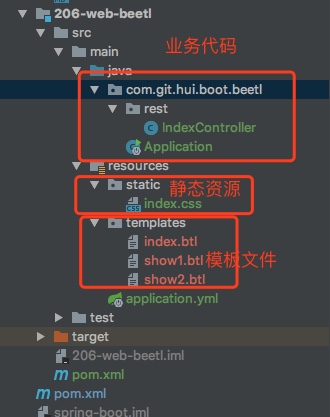
如上图,前端资源文件默认放在resources目录下,下面有两个目录
templates:存放模板文件,可以理解为我们编写的html,注意这个文件名不能有问题static: 存放静态资源文件,如js,css,image等
2. Rest服务
我们这里提供了三个接口,主要是为了演示三种不同的数据绑定方式(和前面两篇博文基本一样)
1
2
3
4
5
6
7
8
9
10
11
12
13
14
15
16
17
18
19
20
21
22
23
24
25
26
27
28
29
| @Controller
public class IndexController {
@GetMapping(path = {"", "/", "/index"})
public ModelAndView index() {
Map<String, Object> data = new HashMap<>(2);
data.put("name", "YiHui Beetl");
data.put("now", LocalDateTime.now().toString());
return new ModelAndView("index.btl", data);
}
private static String[] contents =
("绿蚁浮觞香泛泛,黄花共荐芳辰。\n清霜天宇净无尘。\n登高宜有赋,拈笔戏成文。\n可奈园林摇落尽,悲秋意与谁论。\n眼中相识几番新。\n龙山高会处,落帽定何人。").split("\n");
private static Random random = new Random();
@GetMapping(path = "show1")
public String showOne(Model model) {
model.addAttribute("title", "临江仙");
model.addAttribute("content", contents[random.nextInt(6)]);
return "show1.btl";
}
@GetMapping(path = "show2")
public String showTow(Map<String, Object> data) {
data.put("name", "Show2---->");
data.put("now", LocalDateTime.now().toString());
return "show2.btl";
}
}
|
上面的三种case中
- 第一个是最好理解的,在创建
ModelAndView时,传入viewName和数据
- 第二个是通过接口参数Model,设置传递给view的数据
- 第三种则直接使用Map来传递数据
注意
如果和前面两篇博文进行对比,会发现一个显著的区别,之前的Freemaker, Thymeleaf指定视图名的时候,都不需要后缀,但是这里,必须带上后缀,否则会500错误
三个接口,对应的三个btl文件,如下
index.btl
1
2
3
4
5
6
7
8
9
10
11
12
13
14
15
16
17
18
19
20
21
22
23
24
25
| <!DOCTYPE html>
<html>
<head>
<meta charset="UTF-8">
<meta name="viewport" content="width=device-width, initial-scale=1">
<meta name="description" content="SpringBoot Beetl"/>
<meta name="author" content="YiHui"/>
<meta name="viewport" content="width=device-width, initial-scale=1.0"/>
<title>YiHui's SpringBoot Beetl Demo</title>
<link rel="stylesheet" href="index.css"/>
</head>
<body>
<div>
<div class="title">hello world!</div>
<br/>
<div class="content">欢迎访问 ${name}</div>
<br/>
<div class="sign">当前时间 ${now}</div>
<br/>
<a href="show1">传参2测试</a>
<a href="show2">传参3测试</a>
</div>
</body>
</html>
|
show1.btl
1
2
3
4
5
6
7
8
9
10
11
12
13
14
15
16
17
18
19
| <!DOCTYPE html>
<html>
<head>
<meta charset="UTF-8">
<meta name="viewport" content="width=device-width, initial-scale=1">
<meta name="description" content="SpringBoot Beetl"/>
<meta name="author" content="YiHui"/>
<meta name="viewport" content="width=device-width, initial-scale=1.0"/>
<title>YiHui's SpringBoot Beetl Demo</title>
<link rel="stylesheet" href="index.css"/>
</head>
<body>
<div>
<div class="title">${title}</div>
<div class="content">${content}</div>
</div>
</body>
</html>
|
show2.btl
1
2
3
4
5
6
7
8
9
10
11
12
13
14
15
16
17
18
19
| <!DOCTYPE html>
<html xmlns:th="http://www.thymeleaf.org">
<head>
<meta charset="UTF-8">
<meta name="viewport" content="width=device-width, initial-scale=1">
<meta name="description" content="SpringBoot Beetl"/>
<meta name="author" content="YiHui"/>
<meta name="viewport" content="width=device-width, initial-scale=1.0"/>
<title>YiHui's SpringBoot Beetl Demo</title>
<link rel="stylesheet" href="index.css"/>
</head>
<body>
<div>
<div class="title">${name}</div>
<div class="content">${now}</div>
</div>
</body>
</html>
|
在上面的模板文件中,需要注意引用css样式文件,路径前面并没有static,我们对应的css文件
index.css
1
2
3
4
5
6
7
8
9
10
11
12
13
14
15
16
| .title {
color: #c00;
font-weight: normal;
font-size: 2em;
}
.content {
color: darkblue;
font-size: 1.2em;
}
.sign {
color: lightgray;
font-size: 0.8em;
font-style: italic;
}
|
3. 演示
启动项目后,可以看到三个页面的切换,模板中的数据根据后端的返回替换,特别是主页的时间,每次刷新都会随之改变
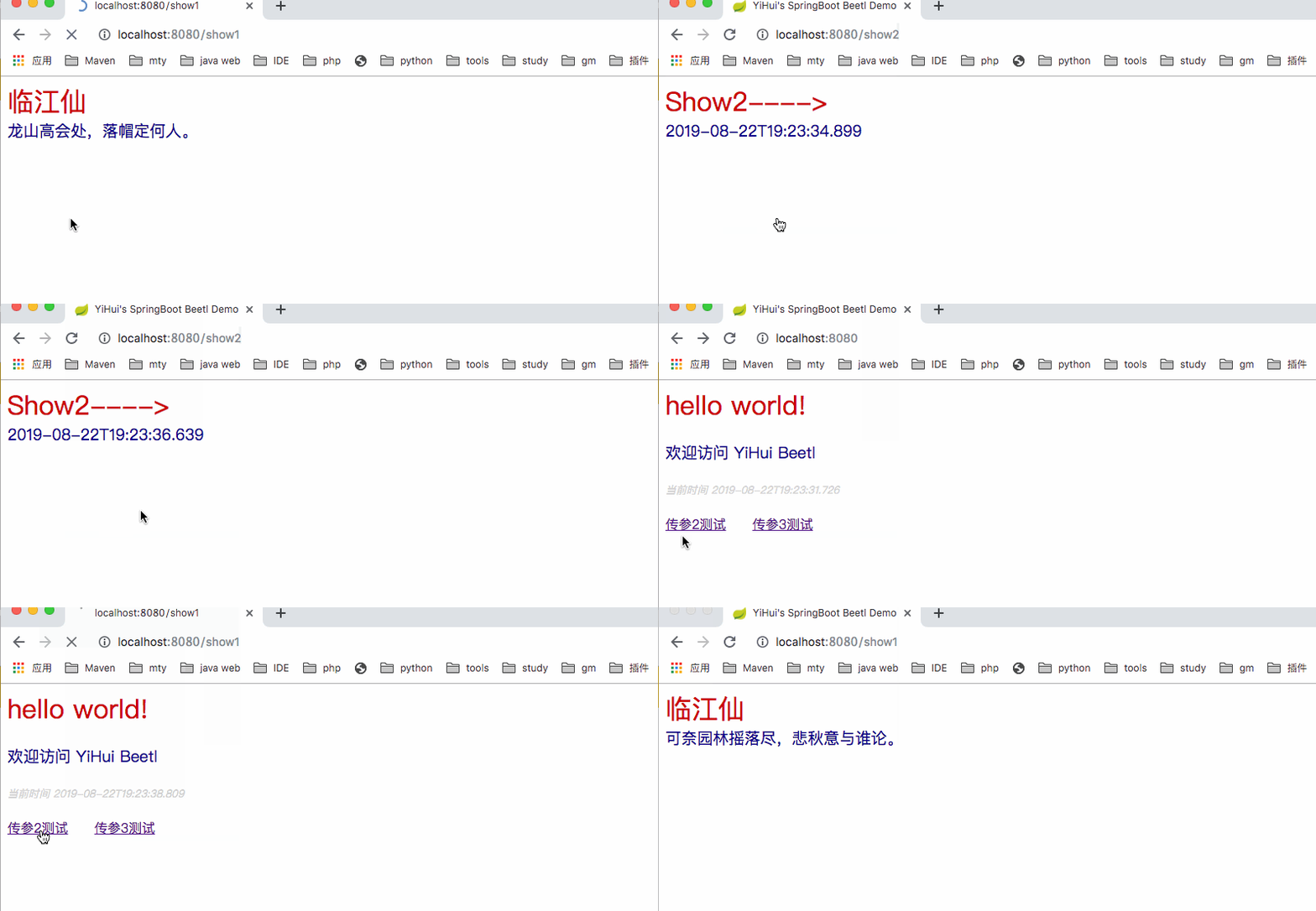
II. 其他
0. 项目
1. 一灰灰Blog
尽信书则不如,以上内容,纯属一家之言,因个人能力有限,难免有疏漏和错误之处,如发现bug或者有更好的建议,欢迎批评指正,不吝感激
下面一灰灰的个人博客,记录所有学习和工作中的博文,欢迎大家前去逛逛

打赏
如果觉得我的文章对您有帮助,请随意打赏。

微信打赏

支付宝打赏