现在大模型的快速发展,已经让其不仅只接受文本,也可以接受图像、音频、视频等多模态数据,SpringAI也提供了相应的模型接口,方便开发者进行多模态模型应用开发
如如 OpenAI 的GPT-4o、Google 的Vertex AI Gemini 1.5、Anthropic 的 Claude3,以及开源模型 Llama3.2、LLaVA 和 BakLLaVA,都能接受文本、图像、音频和视频等多种输入,并通过整合这些输入生成文本响应。
SpringAI提供了非常简单的多模态输入集成,接下来我们通过一个简单实例,来看一下在SpringAI中,如何接入多模态模型
一、准备工作
首先还是得准备一个大模型开发者账号,同样的为了简化大家使用的成本,我们依然采用免费的大模型 - 智谱 来完成
1. 模型选择
我们这里选择的是官方提供的免费图像理解模型 GLM-4V-Flash,基于它来做一个食物图片的分类和卡路里计算
2. 项目创建
创建一个SpringBoot项目,并引入SpringAI依赖,基本流程如 创建一个SpringAI-Demo工程
1
2
3
4
5
6
7
8
9
10
11
12
13
14
15
| <dependencies>
<dependency>
<groupId>org.springframework.boot</groupId>
<artifactId>spring-boot-starter-web</artifactId>
</dependency>
<dependency>
<groupId>org.springframework.ai</groupId>
<artifactId>spring-ai-starter-model-zhipuai</artifactId>
</dependency>
<dependency>
<groupId>cn.hutool</groupId>
<artifactId>hutool-http</artifactId>
<version>5.8.38</version>
</dependency>
</dependencies>
|
说明:我们这里使用 huttol-http 进行互联网的图片下载
3. 密钥配置
在配置文件中,指定密钥和默认的模型
1
2
3
4
5
6
7
8
| spring:
ai:
zhipuai:
api-key: ${zhipuai-api-key}
chat:
options:
model: GLM-4V-Flash
|
二、多模态使用
接下来我们进入多模态的实例开发
1. 图片识别控制器
定义一个图片识别控制器,接收图片的URL,并返回识别结果
1
2
3
4
5
6
7
8
9
10
11
12
13
14
15
16
17
18
19
20
21
22
23
24
25
26
27
28
29
30
31
32
33
34
| @RestController
public class ImgRecognitionController {
private final ChatClient chatClient;
public ImgRecognitionController(ChatModel chatModel) {
this.chatClient = ChatClient.builder(chatModel)
.defaultAdvisors(new SimpleLoggerAdvisor())
.build();
}
@RequestMapping(path = "recognition")
public String recognition(@RequestParam(name = "imgUrl") String imgUrl,
@RequestParam(name = "msg") String msg) {
byte[] imgs = HttpUtil.downloadBytes(imgUrl);
String text = new PromptTemplate("{msg}, 请将图片内容进行识别,并返回结果").render(Map.of("msg", msg));
Media media = Media.builder()
.mimeType(MimeTypeUtils.IMAGE_PNG)
.data(imgs)
.build();
Message userMsg = UserMessage.builder().text(text).media(media).build();
Prompt prompt = new Prompt(userMsg);
return chatClient.prompt(prompt).call().content();
}
}
|
从上面的实现方式也可以看出,多模态的使用方式与ChatModel的使用方式基本一致,只是在构建用户消息的时候,携带了一个 Media 类型的输入
2. 测试
为了测试,使用大模型帮我们生成一张食物图,避免版权纷争
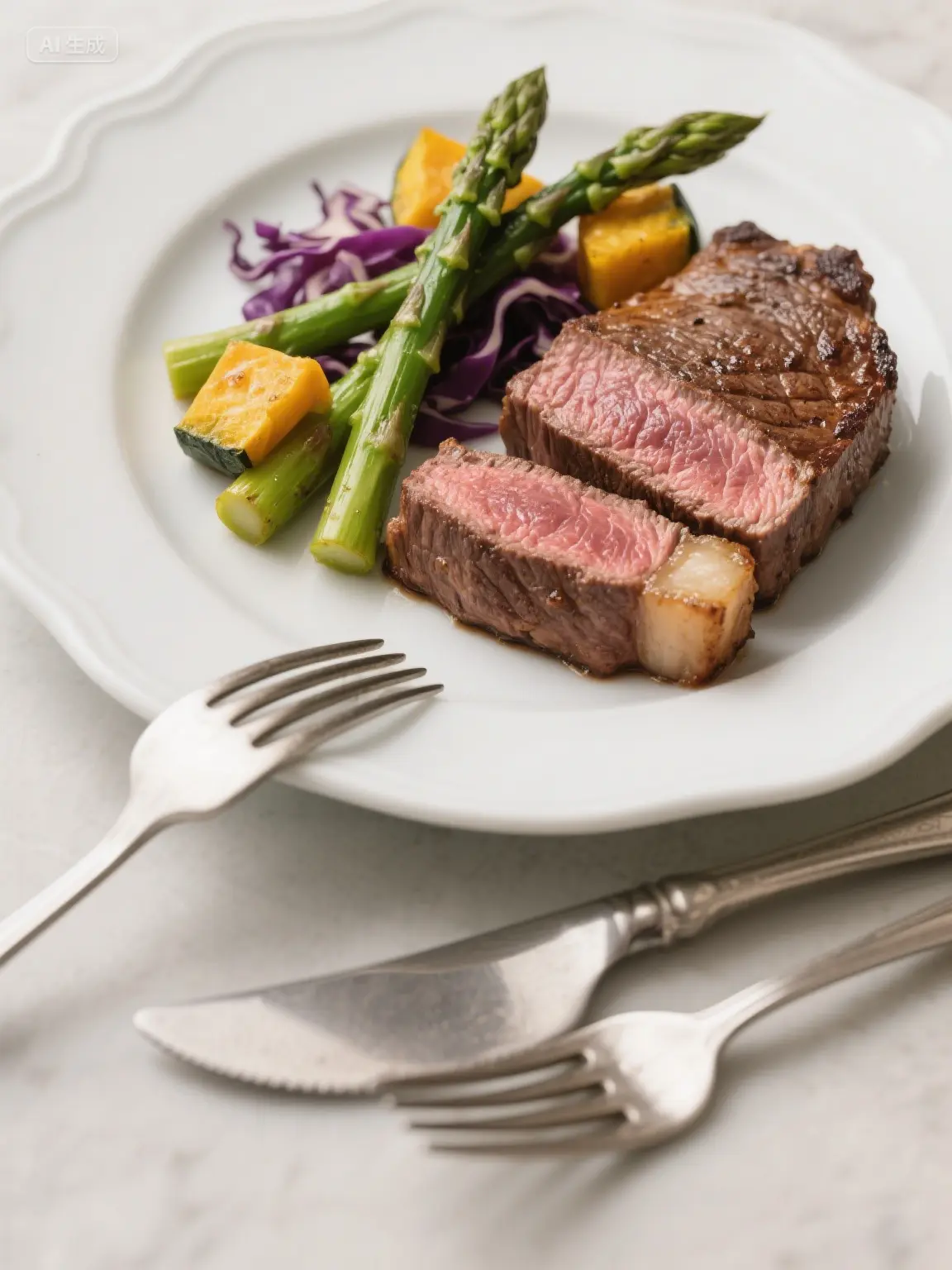
然后访问测试接口,传入图片的URL,并指定识别的提示语
1
| http://localhost:8080/recognition?msg=这是一张食物图片,我想知道里面有什么食物,以及对应的卡路里&imgUrl=https://ai.hhui.top/food.png
|

3. 结构化输出
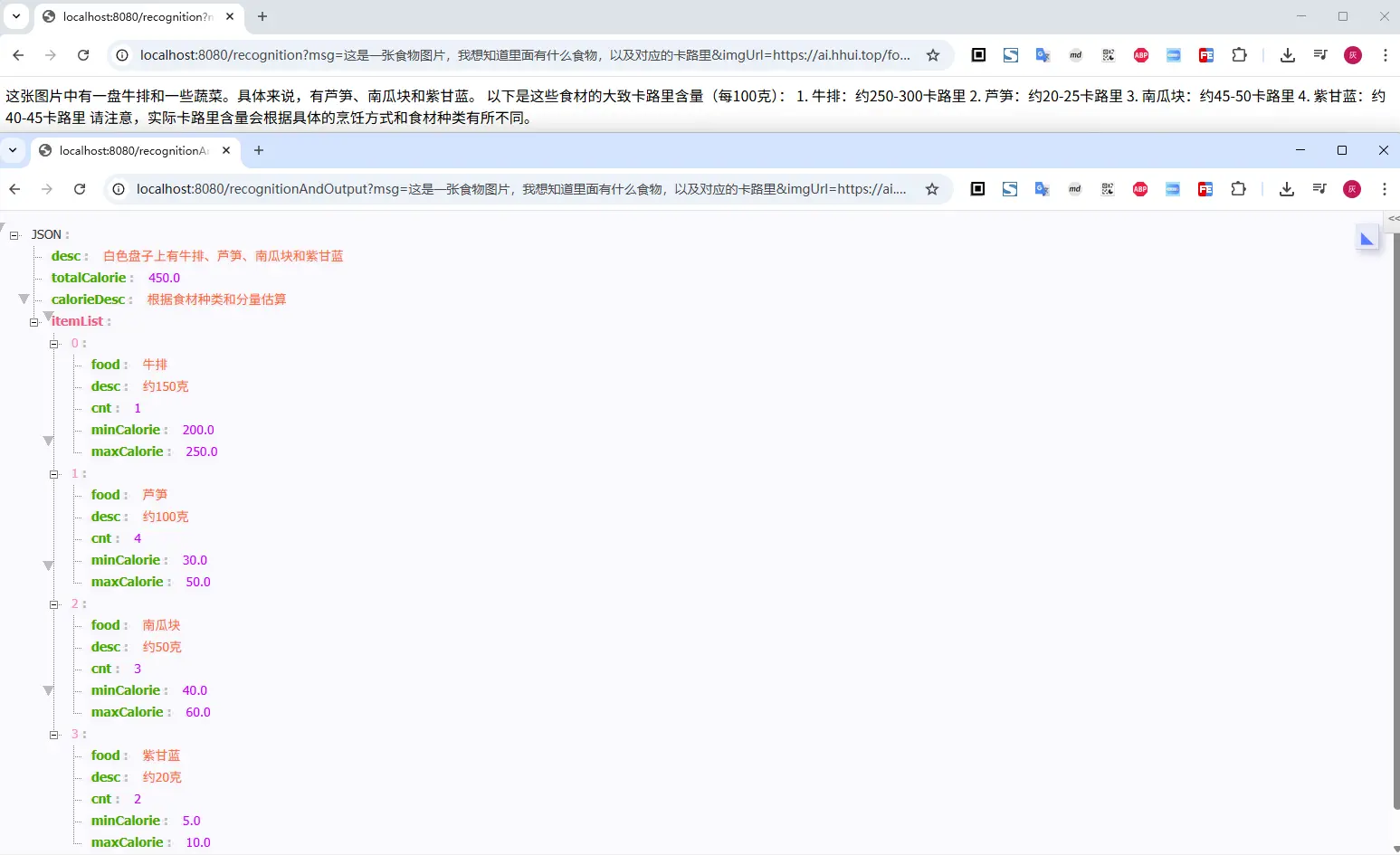
上面直接返回的文本,不太方便我们的业务使用,因此可以考虑将返回结果进行结构化约束,比如,定义我们希望接受的对象(通过 @JsonPropertyDescription 注解来约束字段描述,在生成jsonSchema给大模型时,会将这些描述信息返回给模型)
1
2
3
4
5
6
7
8
9
10
11
12
13
14
15
16
17
18
19
20
21
22
23
| public record FoodDetail(
@JsonPropertyDescription("整张图片的描述")
String desc,
@JsonPropertyDescription("总的卡路里")
Double totalCalorie,
@JsonPropertyDescription("卡路里计算方式说明")
String calorieDesc,
@JsonPropertyDescription("图片中的食材列表")
List<FoodItem> itemList) {
}
public record FoodItem(
@JsonPropertyDescription("食材名")
String food,
@JsonPropertyDescription("食材的卡路里占用描述")
String desc,
@JsonPropertyDescription("食材数量")
Integer cnt,
@JsonPropertyDescription("最小的卡路里含量")
Double minCalorie,
@JsonPropertyDescription("最大的卡路里含量")
Double maxCalorie) {
}
|
然后调整下多模态的调用,通过entity()来定义返回
1
2
3
4
5
6
7
8
9
10
11
12
13
14
15
| @RequestMapping(path = "recognitionAndOutput")
public FoodDetail recognitionAndOutput(@RequestParam(name = "imgUrl") String imgUrl,
@RequestParam(name = "msg") String msg) {
byte[] imgs = HttpUtil.downloadBytes(imgUrl);
String text = new PromptTemplate("{msg}, 请将图片内容进行识别,并返回结果").render(Map.of("msg", msg));
Media media = Media.builder()
.mimeType(MimeTypeUtils.IMAGE_PNG)
.data(imgs)
.build();
Message userMsg = UserMessage.builder().text(text).media(media).build();
Prompt prompt = new Prompt(userMsg);
return chatClient.prompt(prompt).call().entity(FoodDetail.class);
}
|
三、小结
本文主要介绍了多模态的使用,虽然以智谱为例进行了实例介绍;其他的模型使用姿势,实际也差不多,基本上都是ChatModel/ChatClient的使用方式,通过在构建用户消息的时候,携带一个 Media 类型的图片或者音视片资源,即可实现多模态的调用
但是,请注意,在使用多模态之前,前先确认对应的大模型是否支持多模态的调用,否则,可能会导致调用失败
文中所有涉及到的代码,可以到项目中获取 https://github.com/liuyueyi/spring-ai-demo
微信公众号: 一灰灰Blog
尽信书则不如,以上内容,纯属一家之言,因个人能力有限,难免有疏漏和错误之处,如发现bug或者有更好的建议,欢迎批评指正,不吝感激
下面一灰灰的个人博客,记录所有学习和工作中的博文,欢迎大家前去逛逛
打赏
如果觉得我的文章对您有帮助,请随意打赏。
微信打赏

支付宝打赏